Scouting App
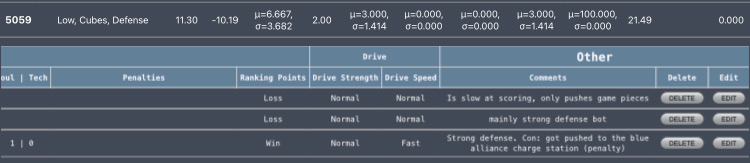
This project was done during my junior and senior years of high school in my high school robotics club. The goal of the scouting app was to collect data on other robots in the competition to figure out how each robot would score in the game, the strategy the team used with the robot, and how consistently the robot would score during the game. When users input the data they collect from the game, the app would calculate the average and mean of the robot. It would be uploaded to a table on the app to display the mean data of the robot for the whole competition. When searching up the team on the app, it would display all of their data from each match, and could be reorganized into a different table to get their mean and average of the competition. This project was done using JavaScript and HTML coding on VSCode. This includes the app design, colors, back-end, and front-end of the app, and collecting data for calculating the mean and average.
When I was working with the group getting the scouting app to work, we were split into two pairs. One pair was the front-end of the program, which contains the store data of the calculation being put into a table. While another club member and I were the back-end of the program, which does all the calculations for the app and sends data that is being collected into the graph. Our mentor, who was helping develop this code, would help us review our code and connect a website API to our code to help get a match list into the app. When I was doing the back-end of the code, we would run into issues about connecting the API to code to help score certain data to the front-end of the app, but we managed to understand how to go around the loop by fixing the key name of the API to have access to it.
From this experience, I learned I would often find myself talking with the front-end group, asking questions about what data they are storing on the table and what they want us to add at the back-end to have access in the app. Additionally, I found that merging code in GitHub with the help of VSCode really helps with solving issues since it highlights what overlaps with each other in the merge that conflicted with each other. Also, I learn the communication with your partner is essential since we are working on the some code, but working on differnt aspects of it and you don’t want to merge when working on the same class file for the code since you might have get the solution in a different way and later have to fix the merging conflict afterwards to choose which solution of code is better.
Here is the scouting app layout: https://docs.google.com/document/d/109sv5VNpk75GmAcP5Ofg75TwocZvwWZzOEhjGlqqbcM/edit?usp=sharing